TH SpareXSpareX
SpareX · plant-floor software

SATI

Supervisory Automation & Telemetry Interface
Always aware. Always in control.

SATI is a SCADA system for the machines across your plant: production machines, lines and utilities. It shows every machine live, raises alarms the moment something goes wrong, records why machines stop, and lets the right people send safe, confirmed commands. It runs on a server at your plant, so it keeps working when the internet doesn't.

สติ

The name is the Thai word sati: mindful awareness. A plant with sati knows what is happening on its floor right now.

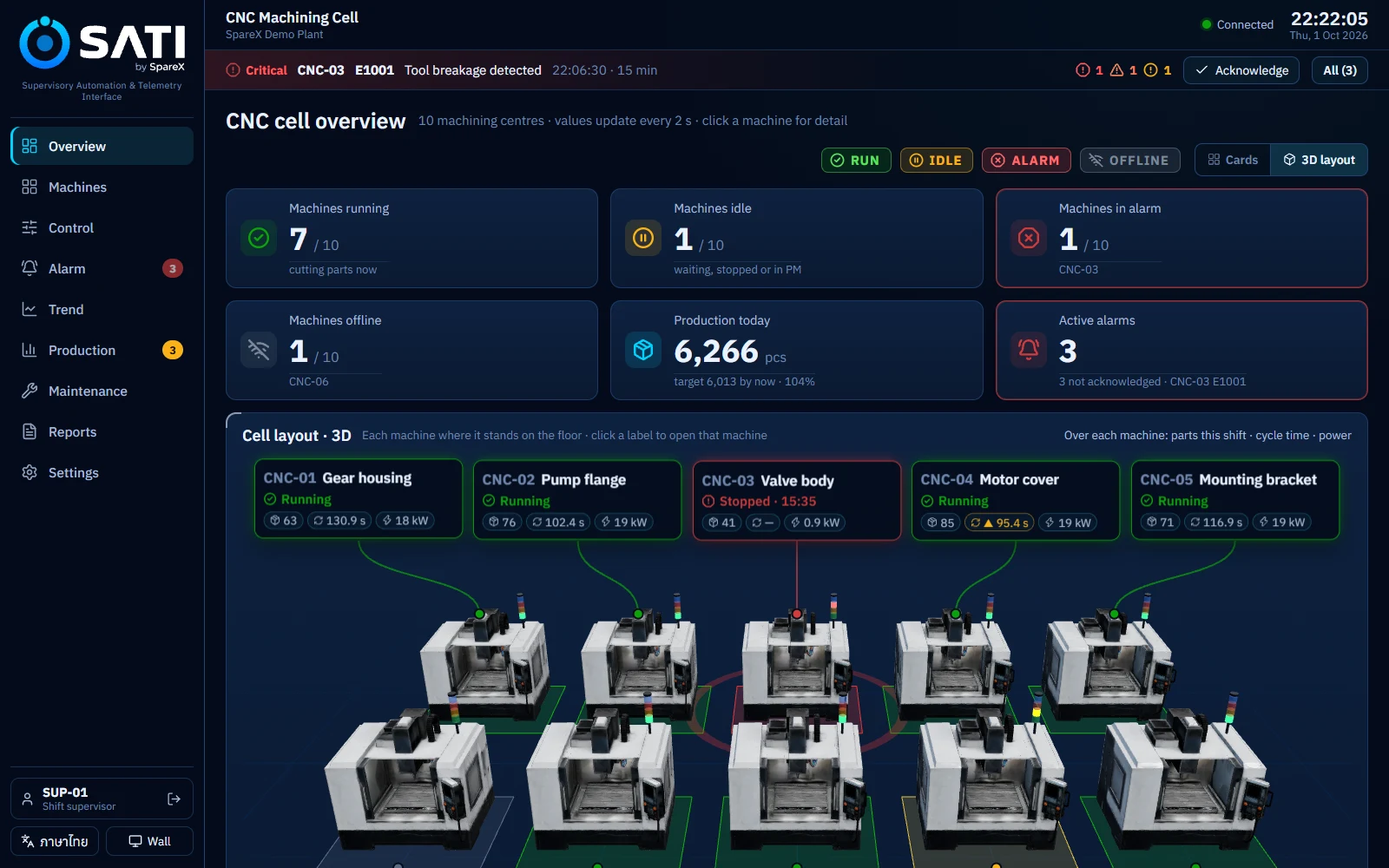
SATI overview of a 10-machine CNC cell: status tiles and a 3D layout with a label for each machine
Cell overview with the 3D layout. Screens in this page come from the SATI demo plant, a 10-machine CNC cell (simulated data).
RUN producing IDLE waiting, stopped, in PM ALARM needs someone now OFFLINE no data from the controller
The basics

What is SCADA?

SCADA is the software layer that lets people watch and run a plant's machines from screens. It sits between the machine controllers on the floor and the business systems in the office.

SSupervisory
CControl
AAnd
DData
AAcquisition

Every CNC machine, press or conveyor already has a controller: a CNC control or a PLC. It knows the spindle speed, the part count and the alarm codes, but only the person standing next to it can see them. SCADA collects that data from every controller, puts it on one set of screens, and keeps a record.

A SCADA system does five things:

  • AcquireReads values from each controller every few seconds: speeds, loads, temperatures, counts, states.
  • DisplayShows the whole floor at a glance, then the detail of one machine.
  • AlarmTells the right people when a value or a machine goes wrong, and tracks who has responded.
  • RecordKeeps a history (the historian) so you can see what happened before a problem.
  • ControlLets authorised people send commands, such as start, stop or reset, with checks before anything moves.
Level 4ERPOrders, purchasing, accountingdays · months
Level 3MES & analyticsOEE, losses, quality, planningshifts · hours
Level 2SCADA / HMILive monitoring, alarms, controlseconds
Level 1ControllersCNC controls, PLCsmilliseconds
Level 0The processSpindles, motors, sensorsreal time

The factory levels from the ISA-95 standard. SATI works at Level 2. SpareX FactoryOS covers Level 3.

SystemQuestion it answersTime scaleWho uses it
SCADAWhat is each machine doing right now, and what needs attention?secondsOperators, supervisors, maintenance
MESHow did the shift go, and where did we lose time and quality?shifts · daysProduction and quality engineers, managers
ERPWhat did we sell, buy, make and invoice?days · monthsOffice, finance, planning
The product

What is SATI?

SATI is SpareX's SCADA for any plant with machines to watch: production machines, assembly and packaging lines, and utilities such as compressors, pumps and boilers. It is built around how people on the floor actually work. Monitor, react to alarms, look at the trend, take action, and record what happened.

One system for every machine on the floor

Machining

CNC lathes, machining centres, grinders

Spindle speed and load, feed, tool life, part count

Presses & forming

Presses, stamping, spring and wire forming

Strokes per minute, tonnage, die counter, stops

Plastics & rubber

Injection and blow moulding, extruders

Cycle time, shot count, barrel and mould temperatures

Assembly & packaging lines

Conveyors, fillers, labellers, testers

Line speed, good and reject counts, jams

Utilities

Air compressors, pumps, boilers, chillers

Pressure, flow, temperature, running hours, kW

Energy & environment

Power meters, temperature and humidity sensors

kW, kWh, power factor, room conditions

The demo plant in this page is a 10-machine CNC cell. At your plant, each machine's signals are mapped to SATI during commissioning, and the same screens, alarms, trends, downtime reasons and reports work for every machine.

On your floor

Machines & controllers
  • Production machines and lines
  • Compressors, pumps, boilers, chillers
  • PLCs, controllers, meters and sensors

At your plant

SATI server
  • Reads every controller every 2 s
  • Alarms, historian, production counts
  • Checks every command before it goes out
  • Keeps running without internet

On any screen

Browser, no install
  • Office PCs and control room
  • Tablets at the machines
  • Phones
  • A 4K information wall
LINE & e-mail

Alerts and summaries go out to the right people. Nothing that comes back by LINE or e-mail can command a machine.

SpareX FactoryOS

Connects by API or MQTT for analysis across days and months: OEE, losses, MTBF, AI analysis.

Reports

A one-page shift or day summary as PDF, and the full data as an Excel workbook.

The cloud never writes to a machine

FactoryOS can only send a recommendation. A person confirms it on SATI, at the plant.

Every command is checked twice

A confirmation dialog on screen, then the server checks the machine's real state before anything moves.

Colour is never the only signal

Every state is colour + icon + word, readable from across the floor and by colour-blind staff.

Who it's for

Built for the people on the floor, and the people who answer for it

SATI suits small and mid-sized manufacturers who run machines, lines and utilities and today rely on walking the floor, whiteboards and Excel to know what is going on.

Operators

See their machines' state and alarms at a glance, and record why a machine stopped with one tap.

Big touch screens, Thai or English, a reason prompt that pops up by itself.

Shift supervisors

Know which machine is behind its hourly target and why, before the shift ends.

Hour-by-hour board, downtime by machine and hour, end-of-shift report.

Maintenance

Get the alarm on LINE, see the trend leading up to it, and plan PM by running hours.

Alarm escalation, trend history, PM due list.

Production & plant managers

One honest picture of output, stops and alarms, the same for everyone.

Information wall, PDF and Excel reports, shift summaries.

Owners & IT

Plant data stays on a server you own, with sign-in and permissions per person.

On-premise, works offline, five roles, audit of every command.

Automotive partsMachining & metal partsPlastics & rubberSprings, stamping & formingElectronics & assemblyFood & beverage packagingPlant utilities & energy

A good fit if…

  • You run machines, lines or utilities with PLCs, controllers or meters.
  • Stops and alarms reach the right person late, or by phone call.
  • Downtime reasons are written on paper, or not at all.
  • You want one screen the whole team trusts, in Thai.
  • You plan to analyse OEE and losses later, and need clean data first.

Not the right tool if…

  • You need a safety system. Emergency stops and guarding stay in the machine's own safety circuit.
  • You run continuous or batch chemical processes that need recipe control (ISA-88).
  • You are looking for accounting or ERP. SATI does not handle orders or invoices.
Features

What SATI does

Everything below is in the product today. The screens show the SATI demo plant, a 10-machine CNC cell; at your plant they show your own machines. Select any screen to see it larger.

Monitor

The whole floor on one screen

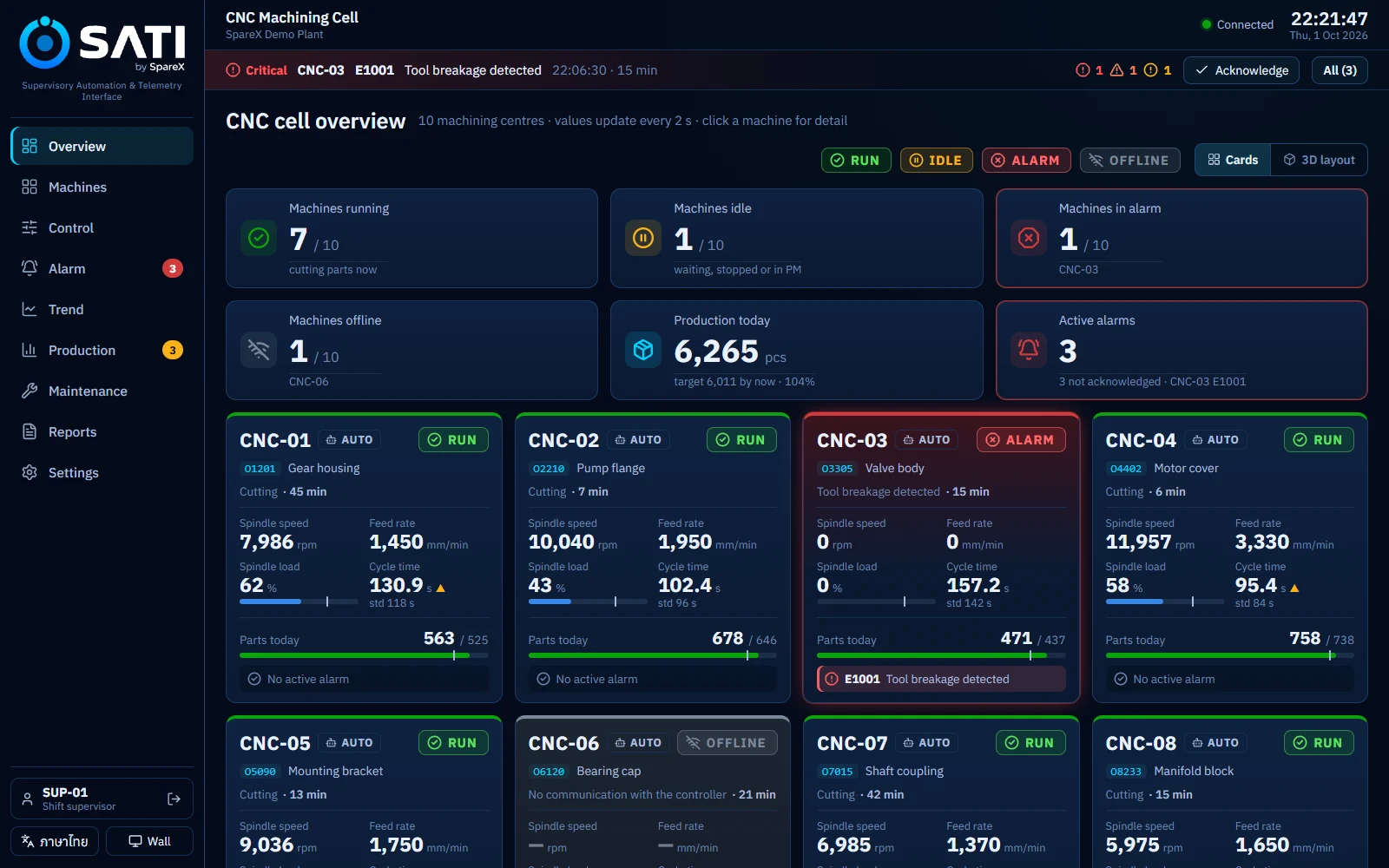
Counts of machines running, idle, in alarm and offline, today's output against target, and a card or 3D view of every machine.

  • Values refresh every 2 seconds
  • Cards or a 3D layout, laid out like your floor
  • Each card: state, the machine's key values, cycle time against standard, output today
  • A stale-data warning if the connection drops
Overview with status tiles and a card for each machine
Machine detail

Everything one machine is telling you

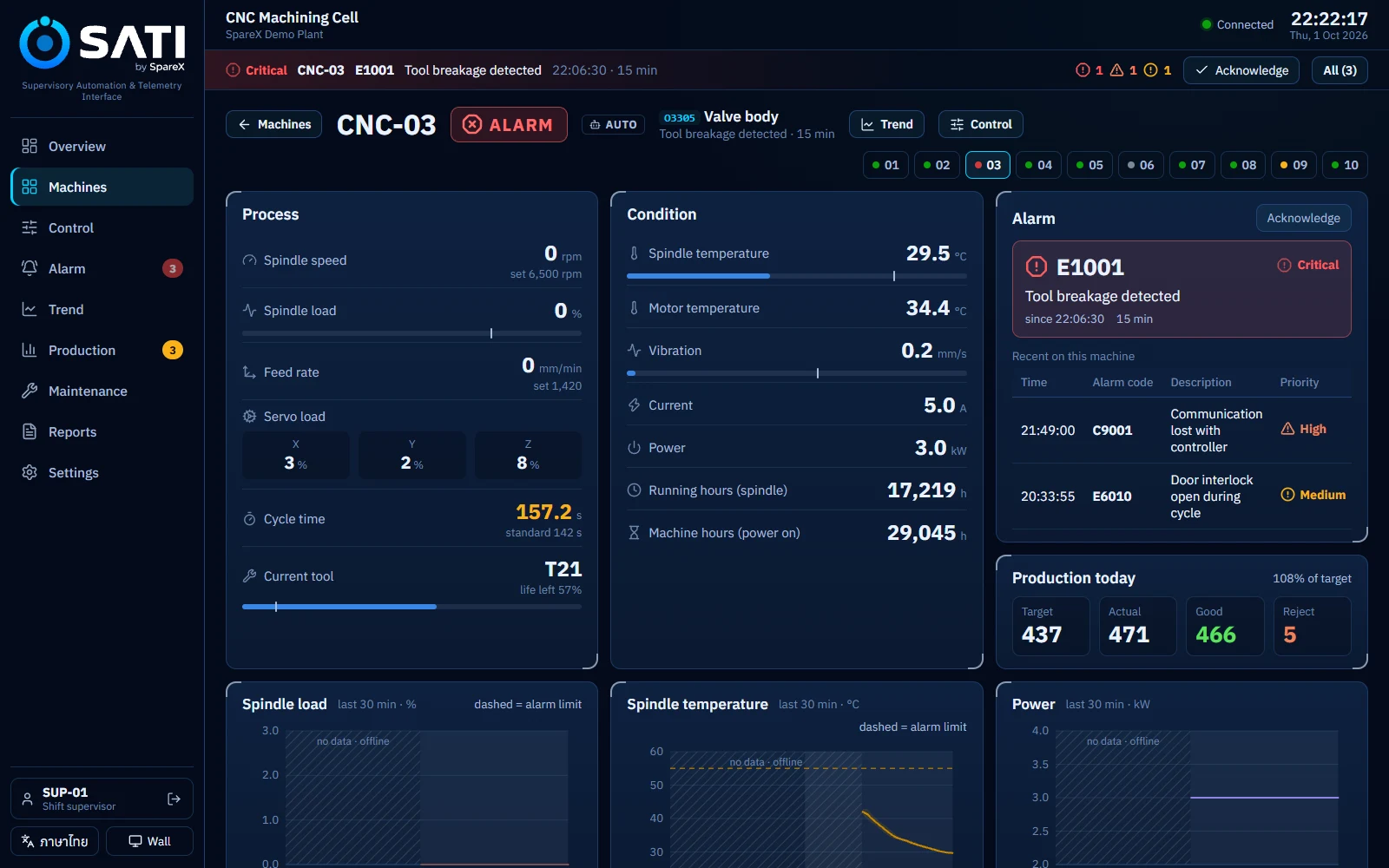
Every signal the machine sends, with its limits, the alarm standing now and today's output. On the CNC in the demo: spindle speed and load, feed rate, servo load on X/Y/Z, temperatures, vibration, current, power and tool life. A press, a moulding machine or a compressor shows its own signals.

  • Alarm history for that machine
  • One click to its trend or its controls
Machine detail page for CNC-03 in alarm
Alarm

Alarms people can act on

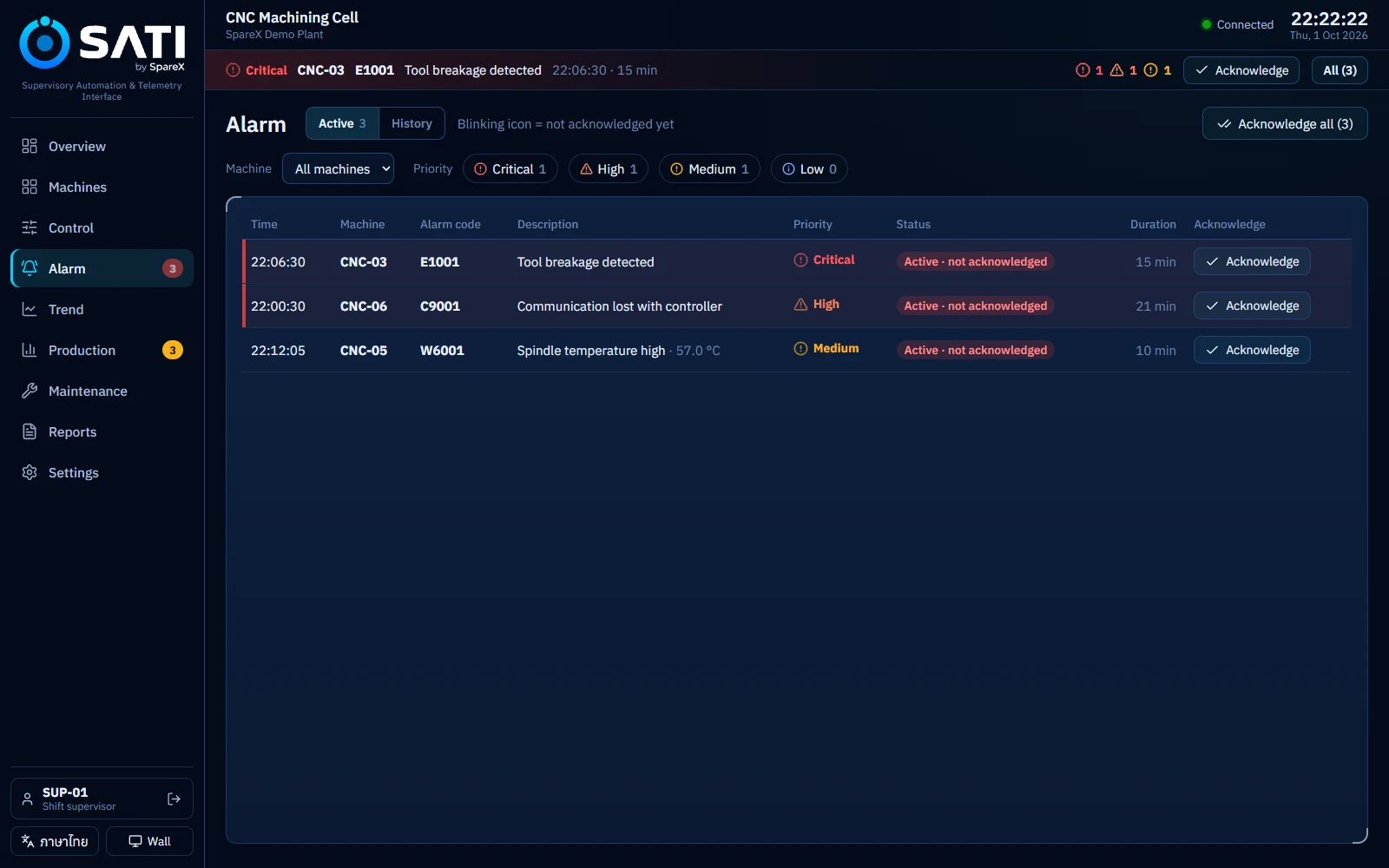
Alarms follow the ISA-18.2 life cycle: a new alarm blinks until someone acknowledges it, and is closed once it has cleared and been acknowledged. Every acknowledgement is recorded with the person's name.

Critical High Medium Low
  • Four priorities, each with its own shape as well as colour
  • The top alarm stays in a bar on every page
  • Condition alarms with deadbands, so a value hovering at the limit doesn't flood the list
  • A 7-day alarm journal you can filter by machine and priority
Alarm page listing standing alarms by priority
Trend

See what led up to it, and compare machines

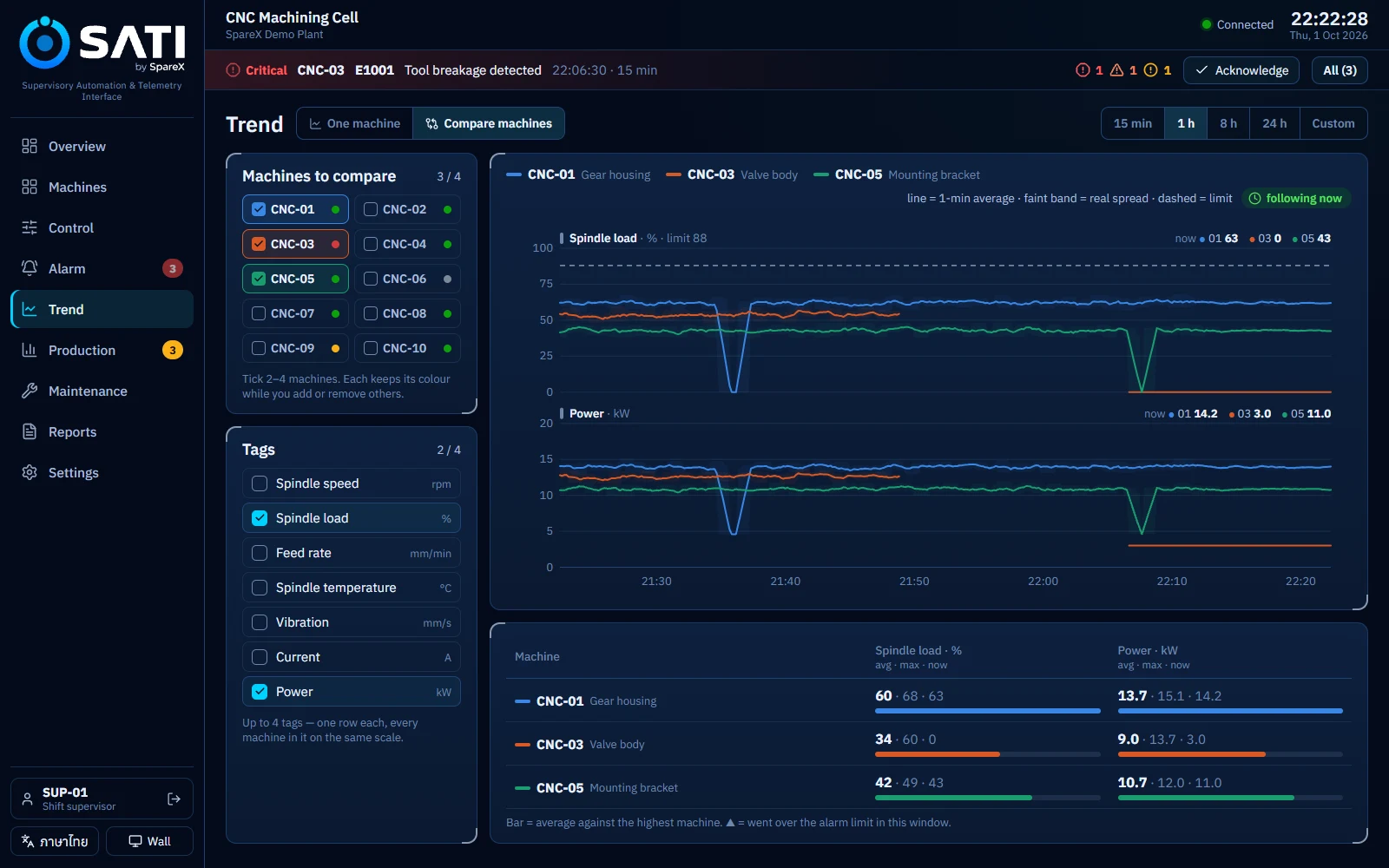
A historian keeps every tag at 10-second resolution for the last 24 hours. Each tag gets its own row with its real unit and limit, so the chart reads at a glance.

  • Compare 2 to 4 machines on the same tags
  • Stretches where a machine wasn't cutting are shaded, so a drop to zero explains itself
  • 15 min, 1 h, 8 h, 24 h or a custom window
  • Average, max and current value for each machine
Trend page comparing spindle load and power on three machines
Control

Commands with two checks

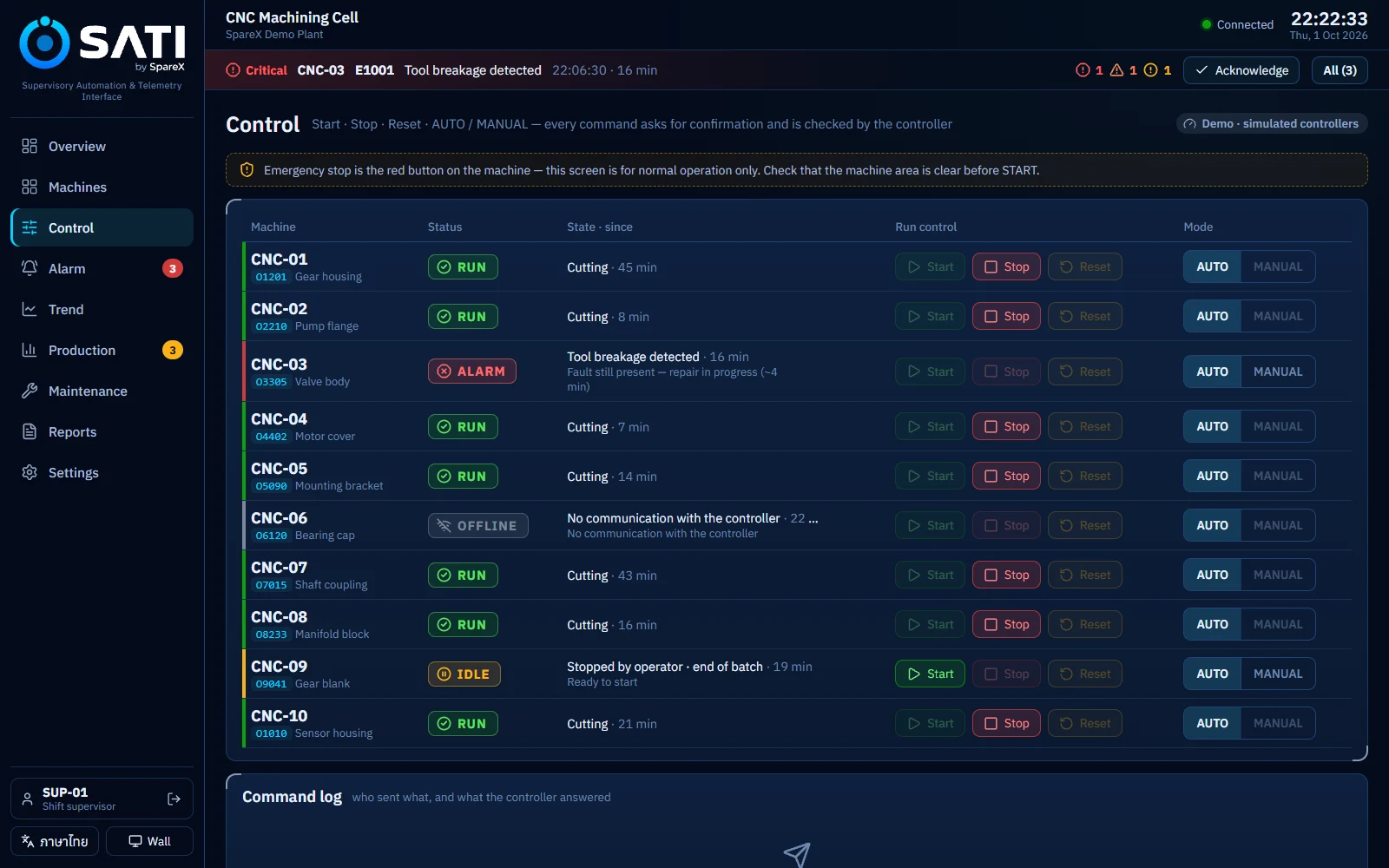
Start, stop, reset, and switch between AUTO and MANUAL. Each command asks for confirmation, then the server checks the machine's real state before anything is sent.

  • Buttons the controller would refuse are greyed out, with the reason
  • Who may do what is set per role and enforced on the server
  • Every command is logged with time, person, machine and result
Control page with machine commands and the command log
Production

Hour by hour against target

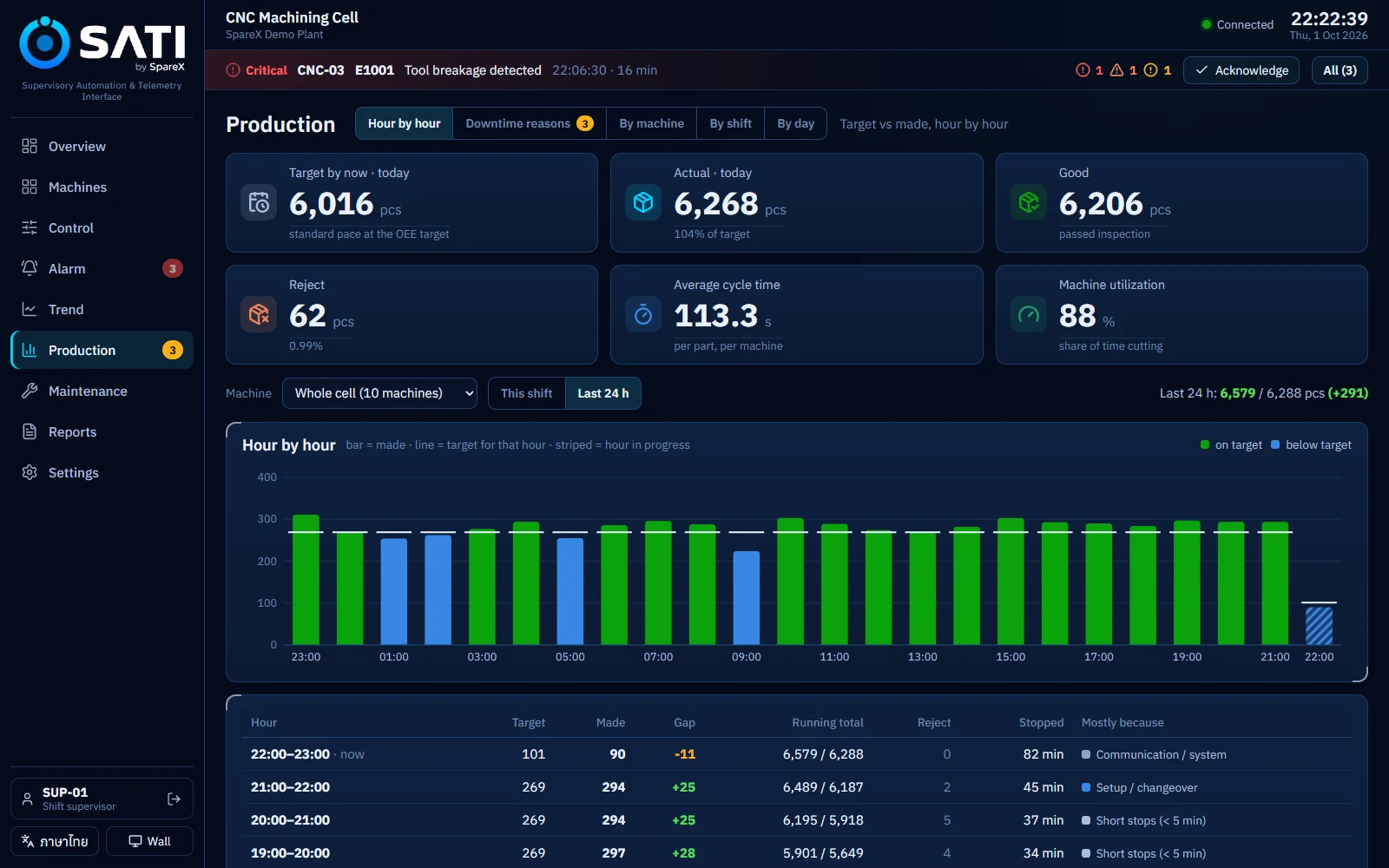
The board a supervisor walks to: each hour's target and output, the running total, minutes stopped and the main reason. Missed hours are visible while there is still time to recover.

  • The whole cell or one machine; this shift or the last 24 hours
  • Output by machine, by shift and by day
  • Targets set from standard cycle time and the OEE target
Hour-by-hour production chart against target with a table below
Downtime reasons

The reason, recorded at the machine

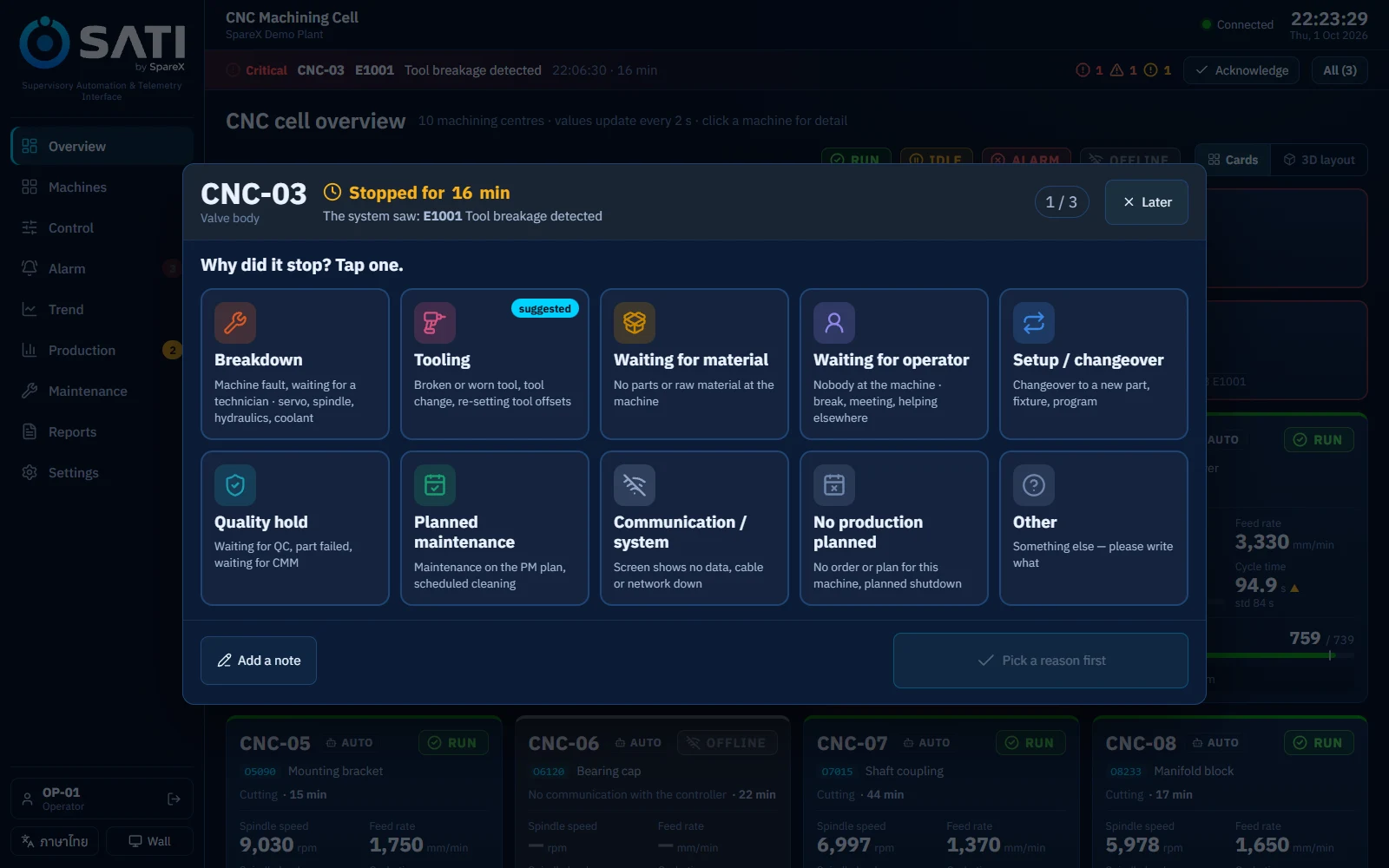
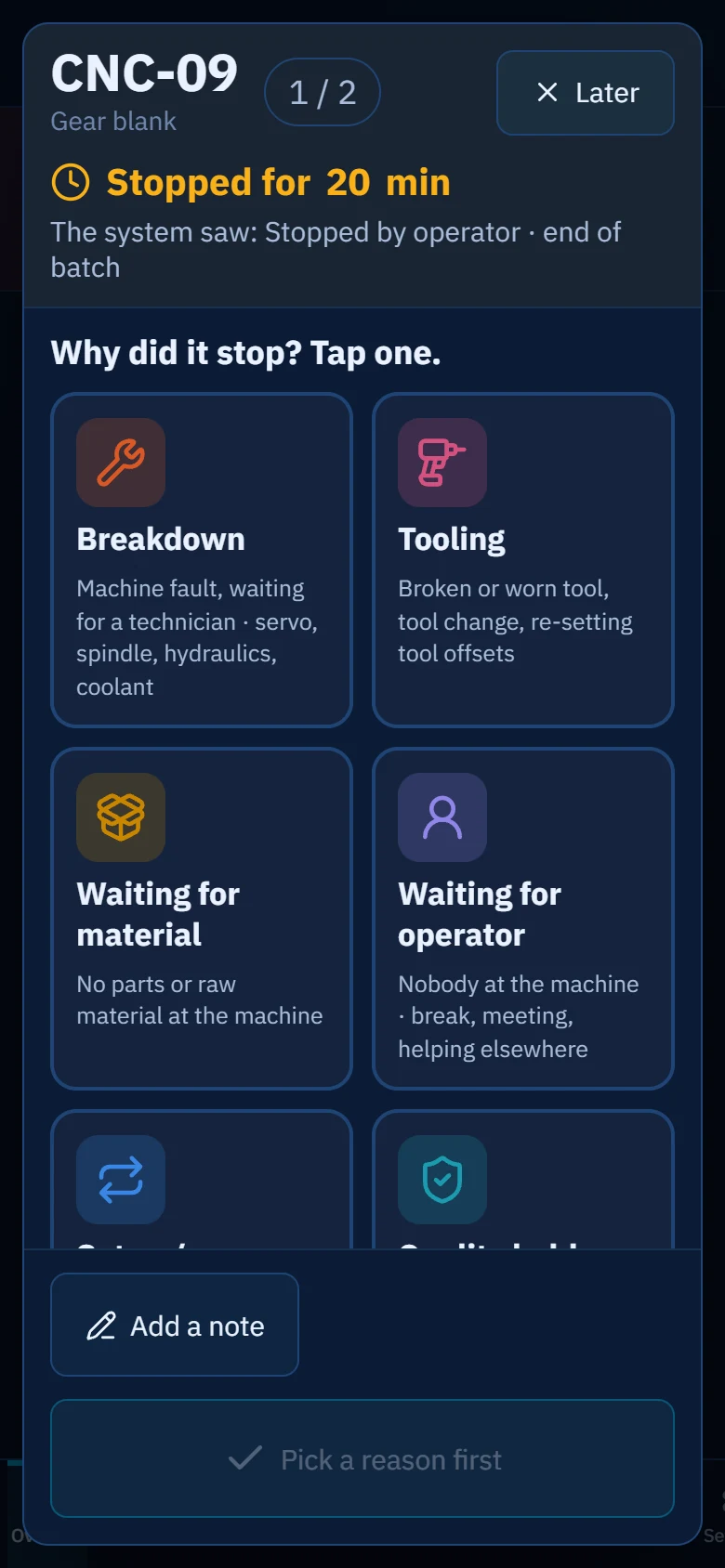
When a machine has been stopped for a minute, its operator's screen asks why. Ten large tiles in a fixed order, each saying what belongs in it, so two operators record the same stop the same way.

  • The system's guess from the alarm code is marked, but never pre-selected
  • The save button reads the choice back, so a mis-tap is caught
  • "Other" requires a short note
  • Stops under 5 minutes are filed as short stops automatically
  • The reasons feed OEE loss analysis in FactoryOS
The reason prompt on a desktop screen with ten reason tiles
The same reason prompt on a phone
Where & when

Which machine stopped most, and when

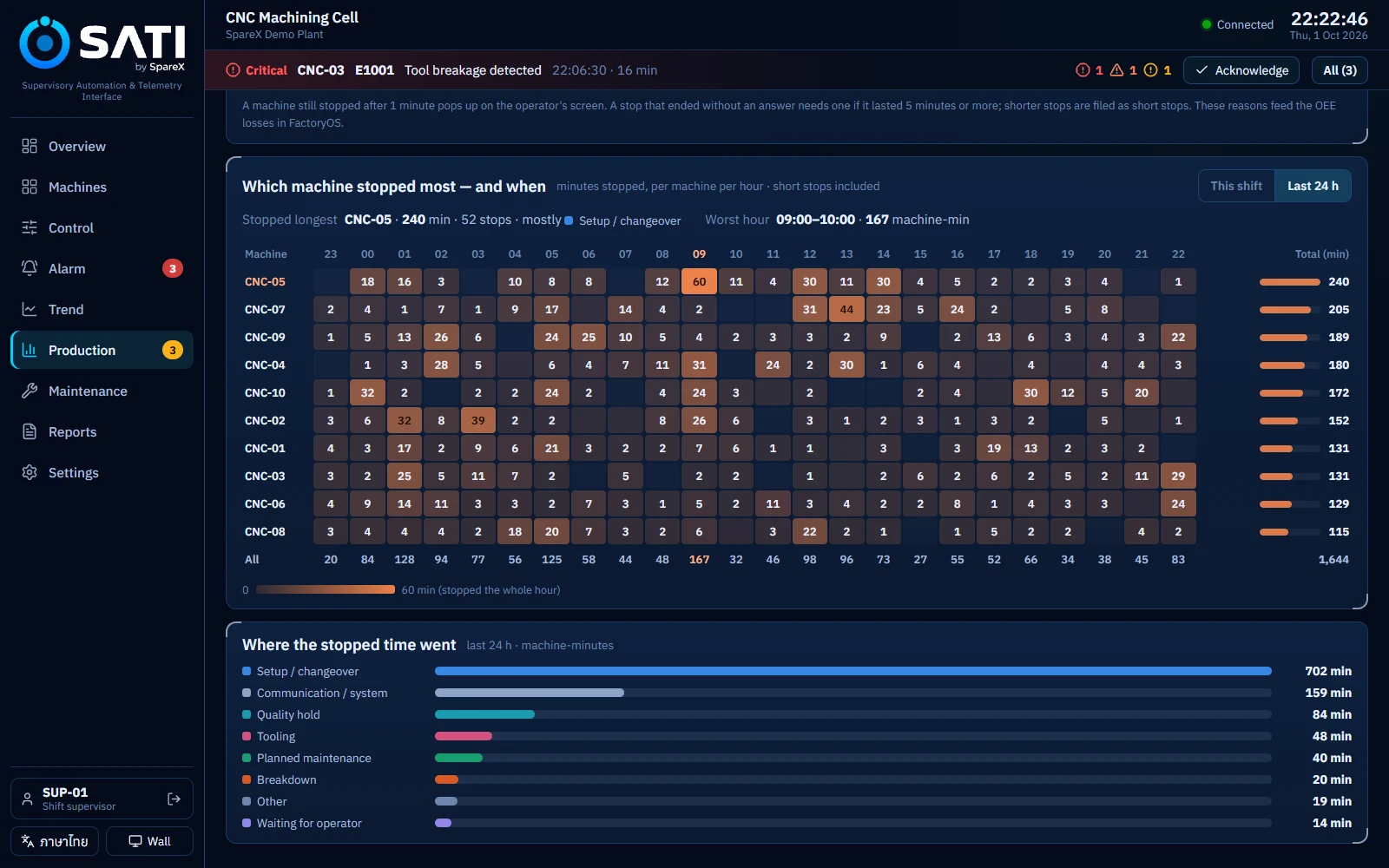
A map of minutes stopped for every machine and every hour. The worst machine and the worst hour are named in words above it, and each machine opens its own list of stops.

  • This shift or the last 24 hours
  • Stopped time by reason, from the operators' answers
Heatmap of minutes stopped by machine and hour
Reports

A shift report as PDF, the full data in Excel

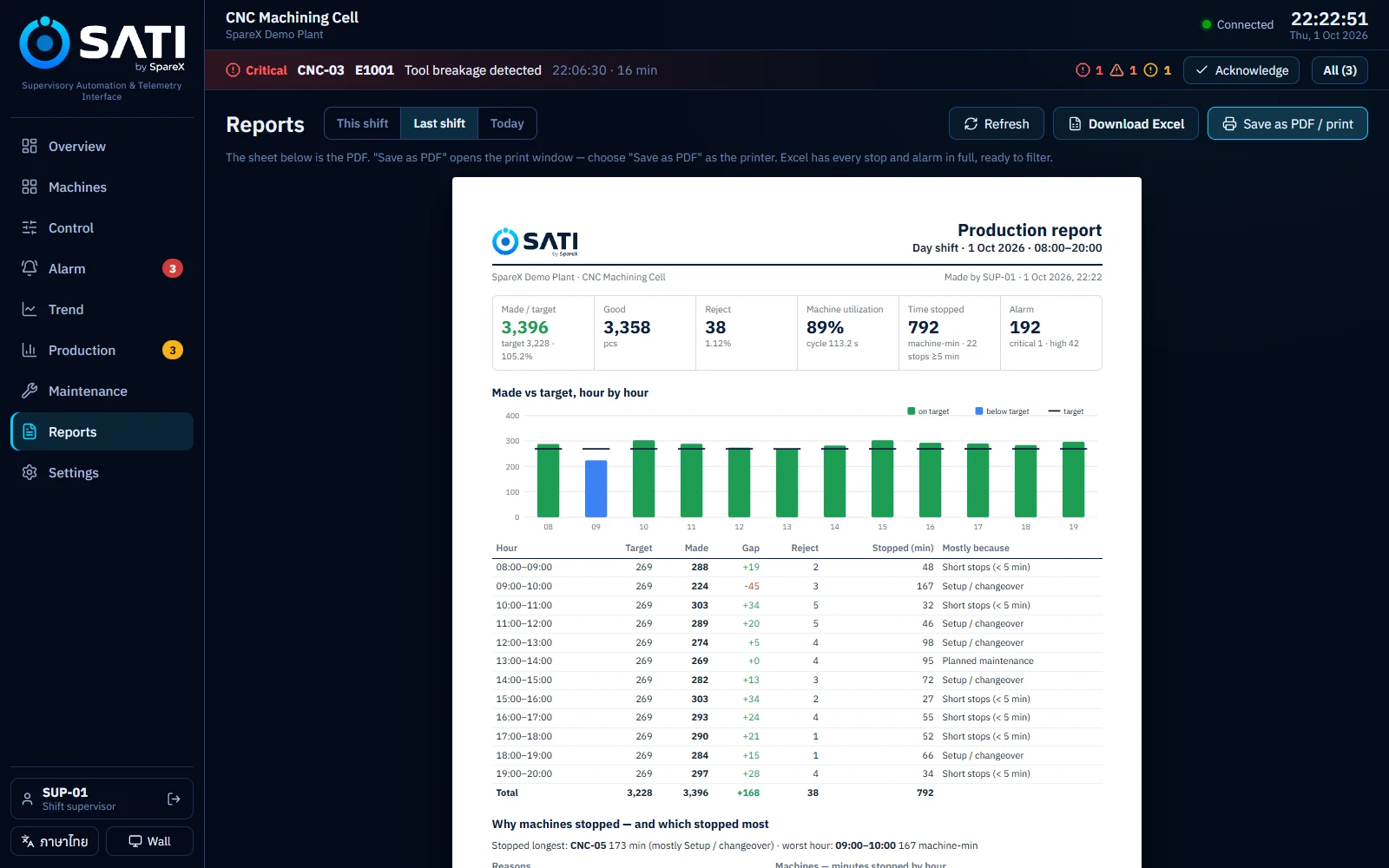
One A4 summary for this shift, the last shift or today: output against target, the hourly table, why machines stopped, results by machine, the longest stops, alarms and PM due, with signature lines for sign-off.

  • Save as PDF or print straight from the browser
  • Excel workbook with 7 sheets: summary, hourly, machines, every stop, stops by hour, alarms, maintenance
  • The PDF and the workbook are built from the same numbers
The A4 production report shown in SATI
Notifications

Alerts on LINE and e-mail, per person

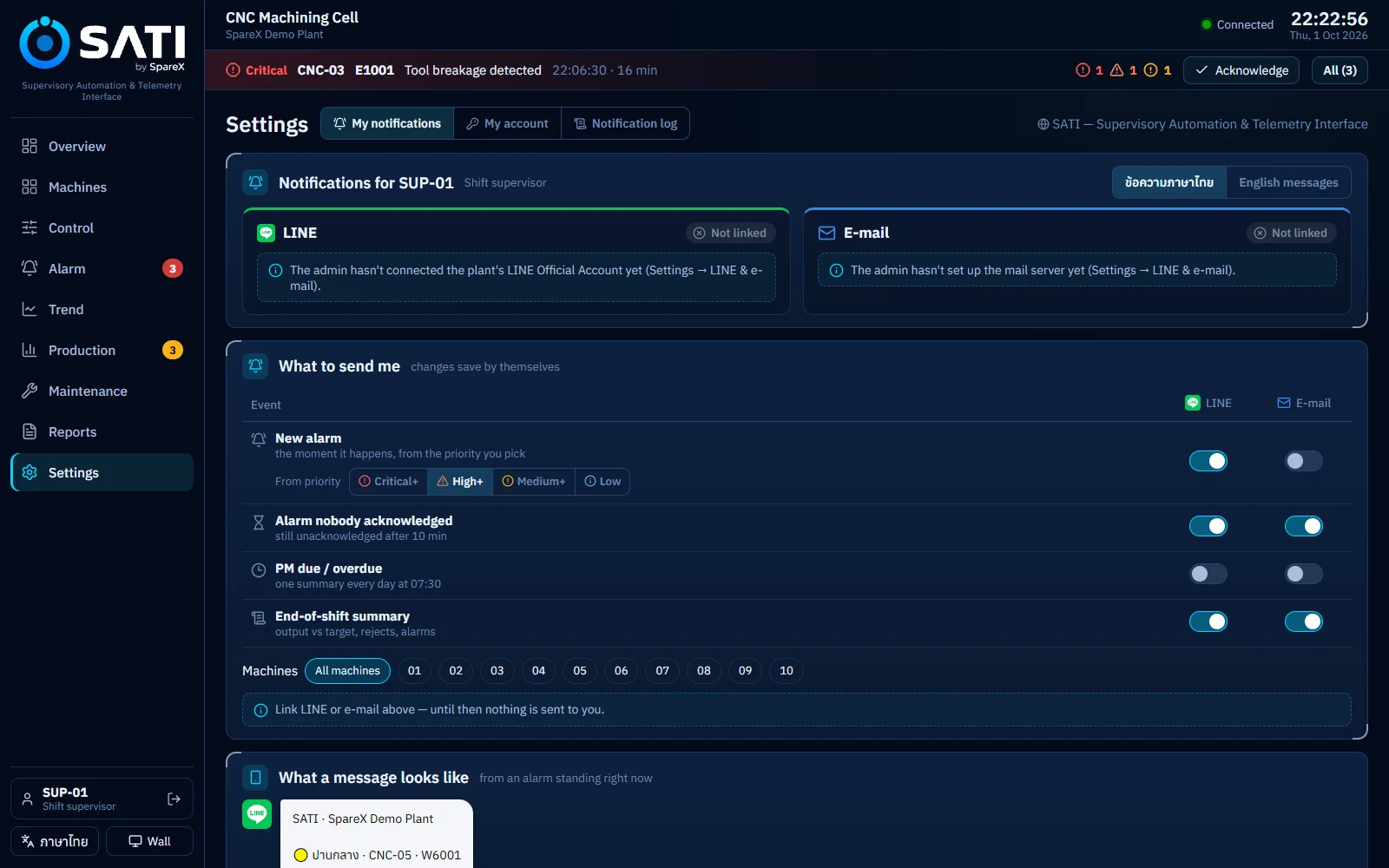
Each person chooses what reaches them and how: new alarms from a chosen priority, alarms nobody has acknowledged, the daily PM summary, and the end-of-shift summary, for all machines or only theirs.

  • LINE Official Account, to a person or a LINE group, linked by a 6-digit code or QR
  • E-mail through your own mail server, verified by code
  • Messages close together are bundled; critical alarms go at once
  • Escalation when an alarm is still unacknowledged after a set time
Notification settings for a shift supervisor
Information wall

A 4K wall for the whole floor

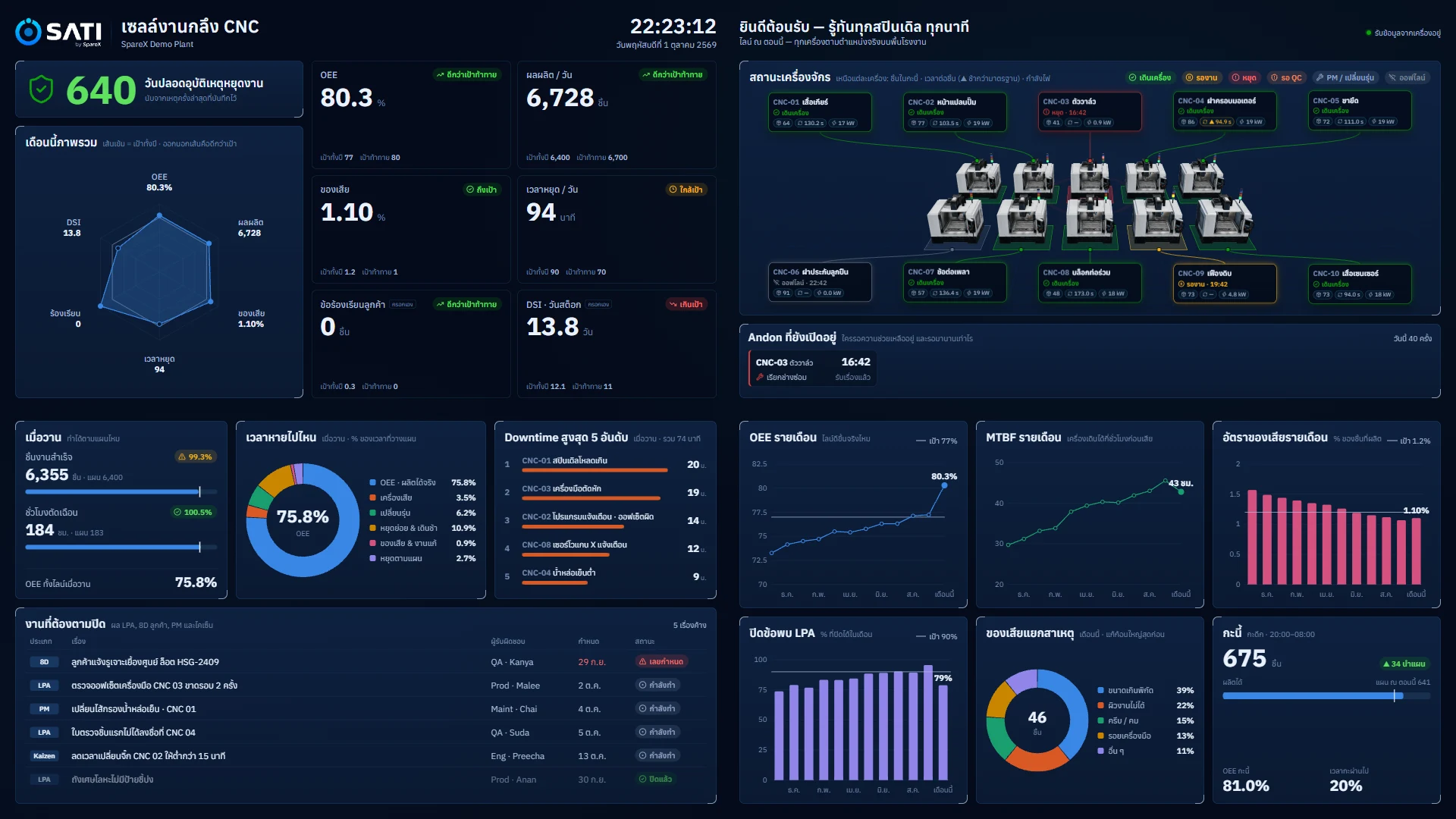
A 2×2 video-wall layout built to be read from 5 to 8 metres: safety days, month-to-date KPIs, machine status on the 3D cell, open Andon calls and follow-up actions.

  • Opens with a read-only display link, no password on the TV
  • The link can be revoked at any time
The SATI information wall in Thai
Information wall, shown in Thai.
Maintenance by running hours

PM falls due by each machine's actual running hours (spindle hours on a CNC). Machines due soon show yellow, overdue show red, and a daily PM summary goes to maintenance.

Any screen

Desktop, tablet and phone layouts, plus the 4K wall. Runs in a web browser; nothing to install on the screens.

Thai and English

Every screen, message and report in both languages. Each person or screen picks its own.

Works offline

Runs on a server at your plant. Monitoring, alarms, control and reports keep working when the internet is down.

Sign-in for everyone

Personal accounts, passwords stored as one-way hashes, lockout after repeated wrong passwords, automatic sign-out of idle sessions.

Roles

Five roles, enforced on the server, not just hidden on screen:

RoleViewAckStart/stopAuto/manSettings
Viewer
Operator
Maintenancestop only
Supervisor
Admin
Specifications

Technical summary

DeploymentOn-premise. One SATI server at the plant (an industrial PC or a small server), on the plant network.
ClientsAny current web browser on PCs, tablets and phones. 4K TVs for the information wall. No client software.
InternetNot needed to operate. Used only for LINE, e-mail and the link to FactoryOS.
MachinesProduction machines (CNC, presses, moulding, assembly and packaging lines) and utilities (compressors, pumps, boilers, chillers, meters). The demo plant in this page is a 10-machine CNC cell.
Machine connectionPLCs, CNC and other machine controllers, and meters are connected during commissioning with SpareX's integration tools. Modbus TCP is supported; the protocol for each of your controllers is confirmed during the site survey.
Update rateScreens refresh every 2 seconds.
History on the serverTrends: 24 hours at 10-second resolution. Alarm journal: 7 days. Production by hour, shift and day. Long-term history and analysis in FactoryOS.
AlarmsISA-18.2 life cycle (unacknowledged, acknowledged, cleared, closed), 4 priorities, deadbands, escalation.
NotificationsLINE Messaging API (person or group) and SMTP e-mail. Outbound only.
Reports & exportA4 PDF summary (this shift, last shift, today). Excel .xlsx workbook with 7 sheets.
SecurityPersonal accounts, 5 roles enforced on the server, hashed passwords, HttpOnly session cookies, lockout after repeated failures, read-only display links, a log of every command and acknowledgement.
IntegrationSpareX FactoryOS by API or MQTT. FactoryOS may recommend; only a person on SATI can command a machine.
LanguagesThai and English.

How a SATI project runs

  1. Site survey

    We walk your floor, list the machines and controllers, and agree what each screen must show.

  2. Connect

    We connect the controllers, map their signals to SATI's tags and check every value against the machine.

  3. Set up

    Shifts, targets, alarm limits, people and roles, LINE and e-mail, and the screens at each machine.

  4. Train & go live

    Operators, supervisors and maintenance learn on their own machines, then SATI goes live shift by shift.

FAQ

Questions we hear

Is SATI only for CNC machines?

No. The demo shows a CNC cell, but SATI is built for every machine in a plant that needs watching: presses, moulding machines, assembly and packaging lines, compressors, pumps, boilers and more. During commissioning we map each machine's signals, and the same screens, alarms, trends, downtime reasons and reports work for all of them.

Does SATI need the internet to work?

No. SATI runs on a server at your plant. Monitoring, alarms, control and reports all keep working without the internet. The internet is only used to send LINE and e-mail messages and to share data with FactoryOS.

Can SATI start and stop our machines?

Yes, if you want it to. Authorised people can start, stop, reset and switch AUTO/MANUAL. Every command needs a confirmation on screen, and the SATI server checks the machine's real state before sending it. Safety functions such as emergency stops stay in the machine's own safety circuit and are never replaced by SATI.

Which machines and PLCs can it connect to?

SATI reads PLCs, CNC and other machine controllers, and meters. We connect them during commissioning with SpareX's integration tools. Modbus TCP is supported, and we confirm the protocol for each of your controllers during the site survey, before the project starts.

How is SATI different from FactoryOS?

SATI is the live control room at the plant: what is happening now, in seconds. FactoryOS is SpareX's analysis platform: OEE, losses, MTBF and AI analysis across days and months. They work together. SATI collects clean data, including why machines stopped, and FactoryOS turns it into improvement.

Will our operators be able to use it?

SATI is designed for the floor: Thai language, large touch targets, and states shown as colour, icon and word. The downtime prompt explains each reason on its tile, so operators don't need to remember codes.

How do alerts reach us?

Through your company's LINE Official Account, to a person or a LINE group, and by e-mail. Each person chooses which events they receive, from which priority, and for which machines. Alarms nobody has acknowledged escalate after a set time.

What devices can we use?

Any current web browser: office PCs, tablets mounted at machines, phones, and TVs for the information wall. There is nothing to install on them.

Where is our data, and who can see it?

On the SATI server at your plant. Everyone signs in with their own account, and what they can do depends on their role. Passwords are stored as one-way hashes, and LINE and mail passwords can't be read back from the settings screens.

Can visitors or a TV show SATI without an account?

Yes. An admin creates a read-only display link for a TV or a visitor screen. It can watch but not change anything, and the admin can revoke it at any time.

Can we get the data out?

Yes. Every shift or day can be saved as a PDF report with signature lines, and downloaded as an Excel workbook with every stop, every alarm and the hourly results.

How long does it take to set up?

It depends on how many machines you have and how their controllers connect. After the site survey we give you a written plan with the timeline.

How is SATI priced?

By site, based on the number of machines and the connection work. Contact SpareX for a quote after a short call about your floor.

See SATI on your own floor

Ask for a demo of SATI on the demo plant, or a site survey of your machines. We'll show you how your own machines would look in SATI on day one.

Book a demo
SATI · Supervisory Automation & Telemetry Interface · by SpareX. Screens show the SATI demo plant with simulated data.